# Vue Js – Introduction
Different ways of utilizing Vue.
Vue can be used to control parts of HTML pages or entire pages .
* Widget approach on a multi-page application.
Vue can also be used to control the entire frontend of a web application.
* SPA approach – Server only sends one HTML page, thereafter, Vue takes over and controls the UI.
**{{ }}** -> interpolation syntax
Vue renders the data using the interpolation syntax, it can render Strings, Numbers, Booleans, Arrays, Objects etc.
Interpolation syntax can also render JavaScript expressions.
My Course Goal
{{courseGoal}}
{{stringVar}}
{{numberVar}}
{{boolVar}}
{{arrayVar}}
{{objectVar}}
{{3+4}}
const app = Vue.createApp({
data() {
return {
courseGoal: "Finish Vue!!!",
stringVar: "Hello World",
numberVar: 123,
boolVar: true,
arrayVar: [99, 100, 100],
objectVar: { name: "John" },
};
},
});
app.mount("#user-goal");
Vue – interpolation
**createApp** creates a Vue instance which is mount on a certain part of the html page (some div) or the entire page (body), denoted by a CSS selector.
**createApp** takes in an object – which has a **data function** – **that further returns an object**. This data function name can not be altered, under the hood Vue sees the data function and does the necessary stuffs.
Vue.createApp({ // createApp takes in an object
data() { // data function
return {}; // returns an object
},
});
**v-bind directive:**
v-bind directive helps to bind to html attributes, ex: href, src etc.
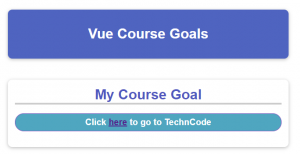
My Course Goal
Click here to go to TechnCode
const app = Vue.createApp({
data() {
return {
courseGoal: "Finish Vue!!!",
link: "http://techncode.xyz/",
};
},
});
app.mount("#user-goal");
v-bind directive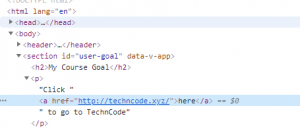
[https://github.com/anurag1302/to-do-list-vue](https://github.com/anurag1302/to-do-list-vue)
[https://github.com/anurag1302/vue-basics-1](https://github.com/anurag1302/vue-basics-1)